
SQL Topic
Views, Stored Procedures & Functions
These features let you add logic, security, and automation directly inside the database engine.
1. Creating & Using Views
A view is a saved SQL query that behaves like a virtual table.
Why use views?
-
Hide complex queries
-
Improve readability
-
Control access to sensitive columns
-
Create reusable data layers (BI reporting, analytics)
Example: Simple View
CREATE VIEW active_customers AS SELECT customer_id, customer_name, email FROM customers WHERE is_active = 1;
Use it like a table:
SELECT * FROM active_customers;
Updatable vs. non-updatable views
-
Simple views can often be updated.
-
Views with
JOIN,GROUP BY, or aggregate functions cannot be updated.
2. What Are Stored Procedures?
A stored procedure is a block of SQL stored on the server, often used for automation or repeated tasks.
Benefits:
-
Reusable business logic
-
Faster than sending SQL from the application each time
-
Better security (permissions on procedure instead of tables)
-
Useful for maintenance, bulk operations, workflows
Example: Procedure to deactivate a customer
(MySQL syntax example)
DELIMITER $$ CREATE PROCEDURE deactivate_customer(IN p_customer_id INT) BEGIN UPDATE customers SET is_active = 0 WHERE customer_id = p_customer_id; END $$ DELIMITER ;
Run it:
CALL deactivate_customer(42);
3. Stored Functions
A stored function returns a single value (unlike procedures, which may perform many actions).
Good for:
-
Data validation
-
Reusable calculations
-
Transforming data in SELECT statements
Example: Function to validate email
DELIMITER $$ CREATE FUNCTION is_valid_email(email VARCHAR(255)) RETURNS BOOLEAN DETERMINISTIC BEGIN RETURN email LIKE '%@%'; END $$ DELIMITER ;
Use it:
SELECT is_valid_email('test@example.com');
4. Triggers
A trigger runs automatically when data is inserted, updated, or deleted.
Types:
-
BEFORE INSERT
-
AFTER INSERT
-
BEFORE UPDATE
-
AFTER UPDATE
-
BEFORE DELETE
-
AFTER DELETE
Common Uses
-
Auto timestamps
-
Audit logs (who changed what)
-
Validating data before write
-
Enforcing business rules
-
Cascading logic
Example 1: BEFORE INSERT trigger for timestamps
CREATE TRIGGER set_created_at BEFORE INSERT ON orders FOR EACH ROW BEGIN SET NEW.created_at = NOW(); END;
Example 2: AFTER UPDATE audit log
CREATE TRIGGER log_price_change AFTER UPDATE ON products FOR EACH ROW BEGIN INSERT INTO price_history(product_id, old_price, new_price, changed_at) VALUES (OLD.product_id, OLD.price, NEW.price, NOW()); END;
5. Automation & Enforcing Rules at the Database Level
You can enforce logic inside the DB instead of relying on the application.
Examples:
| Feature | Example use |
|---|---|
| Views | Limit access to salary column |
| Stored Procedures | End-of-month batch processing |
| Functions | Validate phone numbers |
| Triggers | Automatic updated timestamps |
| Constraints | Ensure price > 0 |
This provides data integrity, security, and consistency.
6. Practical Exercises (with examples)
✔ Exercise 1: Create a sales_summary view
CREATE VIEW sales_summary AS SELECT o.order_id, o.customer_id, SUM(oi.quantity * oi.price) AS order_total FROM orders o JOIN order_items oi USING (order_id) GROUP BY o.order_id, o.customer_id;
Test it:
SELECT * FROM sales_summary;
✔ Exercise 2: Write a stored function to validate input
Example: Validate quantity (must be > 0)
DELIMITER $$ CREATE FUNCTION valid_quantity(qty INT) RETURNS BOOLEAN DETERMINISTIC BEGIN RETURN qty > 0; END $$ DELIMITER ;
Use it:
SELECT valid_quantity(-5); -- returns 0 SELECT valid_quantity(10); -- returns 1
✔ Exercise 3: Implement a trigger for automatic timestamps
CREATE TRIGGER set_updated_at BEFORE UPDATE ON products FOR EACH ROW BEGIN SET NEW.updated_at = NOW(); END;
Automatically sets updated_at whenever a product changes.
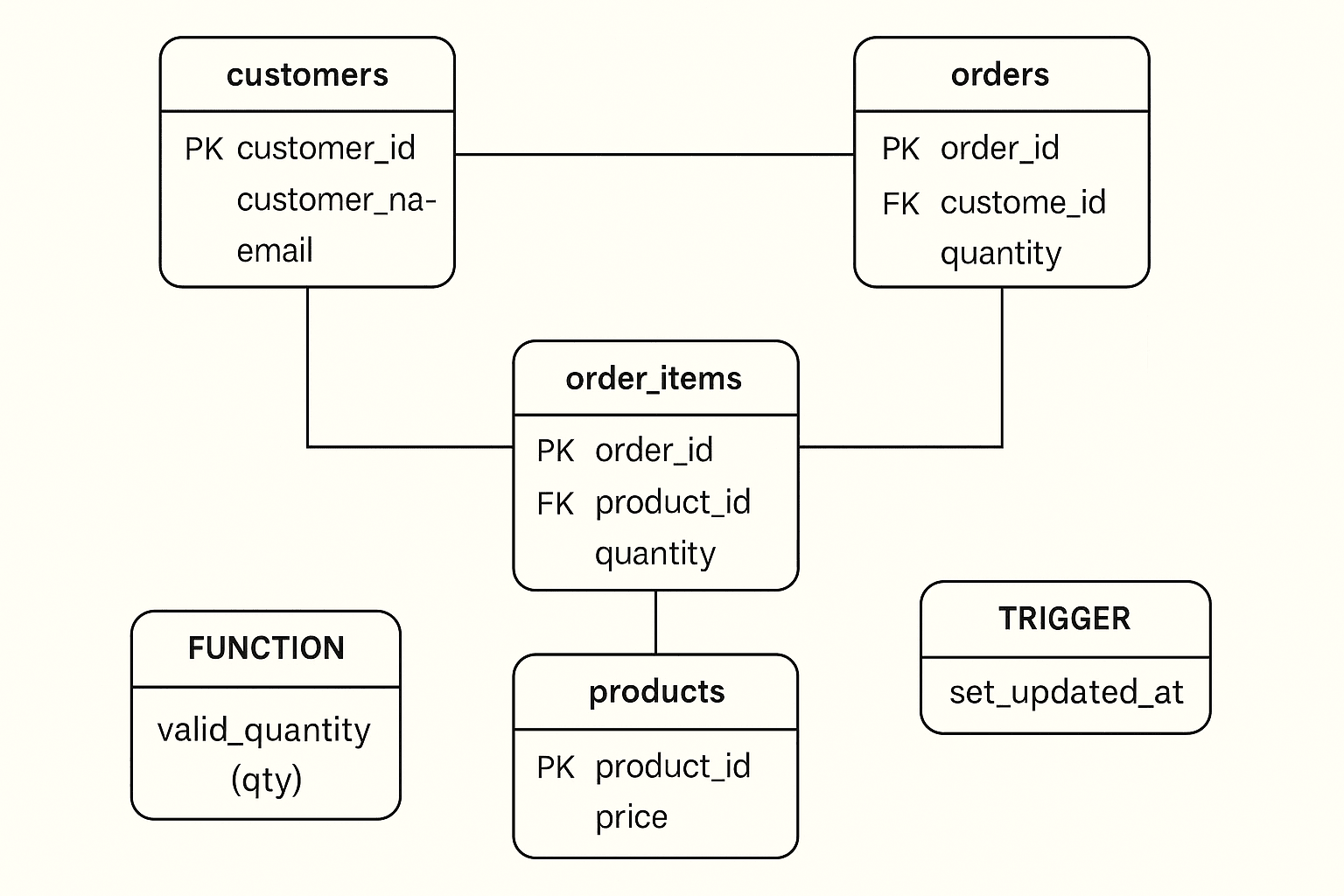
A full ERD showing triggers/functions interacting


Comments (0)
No comments yet. Be the first to comment!