
Spring Boot Topic
What is Spring Boot?
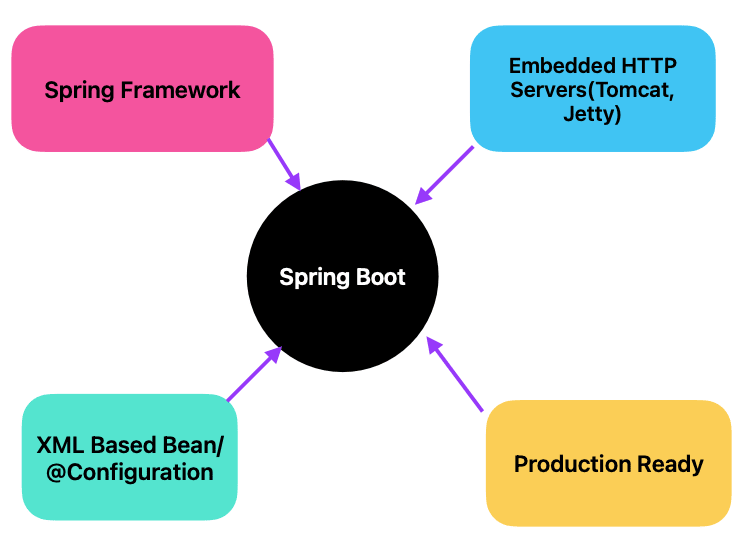
Spring Boot is an open-source Java framework built on top of the Spring Framework. It's designed to simplify the development of standalone, production-grade Spring applications.
Key Features and Benefits:
- Auto-configuration: It automatically configures your application based on the dependencies you include. This significantly reduces boilerplate code.
- Embedded Server: Spring Boot includes embedded servers like Tomcat or Jetty, making deployment easier.
- Convention over Configuration: It follows sensible defaults, so you often don't need to specify configuration properties.
- Production Ready Features: It provides features like health checks, metrics, and externalized configuration for production environments.
- Rapid Development: It speeds up development time by handling common setup tasks.
A Simple Spring Boot REST API Example
Let's create a basic Spring Boot application that exposes a REST endpoint to return a greeting.
@RestController
public class GreetingController {
   @GetMapping("/greeting")
   public String greeting() {
     return "Hello, World!";
   }
}
Why Use Spring Boot?:
- Faster development: Spend less time on configuration and more time on business logic.
- Easier deployment: Deploy your applications as standalone JARs.
- Improved productivity: Leverage pre-configured components and best practices.
- Better application structure: Encourages clean and maintainable code.
Spring Initializr
Spring Initializr is a web-based tool provided by the Spring community to help developers quickly generate Spring Boot project structures with the necessary dependencies. It simplifies the setup process, allowing developers to focus on writing code rather than configuring the project from scratch.
1. Features of Spring Initializr
- Project Type: Choose between Maven or Gradle as the build tool.
- Spring Boot Version: Select the version of Spring Boot you want to use.
- Project Metadata: Define key project details such as Group, Artifact, Name, Description, and Package Name.
- Dependencies: Add dependencies such as Spring Web, Spring Data JPA, Spring Security, and more.
2. How to Use Spring Initializr
Using Spring Initializr is straightforward:
- Go to the Spring Initializr website.
- Fill in the project details such as project type, language, Spring Boot version, and project metadata.
- Select the dependencies your project requires, such as Web, JPA, or Security.
- Click the Generate button to download a pre-configured project as a ZIP file.
- Unzip the file and import the project into your IDE (e.g., IntelliJ IDEA, Eclipse, or VS Code).
3. Example: Creating a Simple Spring Boot Project
For example, to create a simple Spring Boot web application:
- Choose Maven as the project type.
- Select Java as the language.
- Pick the latest Spring Boot version.
- Enter your project's metadata.
- Add the Spring Web dependency.
- Generate the project and import it into your IDE.
After importing, you'll have a ready-to-run Spring Boot application with basic configurations.
4. Benefits of Using Spring Initializr
- Time-saving: Quickly set up projects with essential configurations.
- Consistency: Ensures consistent project structure and dependencies.
- Easy to Use: A user-friendly interface that simplifies the setup process.
Spring Initializr is an invaluable tool for Spring developers, enabling rapid setup and configuration of Spring Boot projects, making it easier to start building applications with the Spring framework.
Creating Your First Project in Spring Boot
Spring Boot simplifies the process of building stand-alone, production-ready Spring applications. Here's a step-by-step guide to creating your first Spring Boot project using Spring Initializr.
Step 1: Access Spring Initializr
Go to the Spring Initializr website. This tool helps you generate a Spring Boot project with just a few clicks.
Step 2: Configure Your Project
Fill in the project configuration details:
- Project Type: Choose either Maven or Gradle as your build tool.
- Language: Select Java (or Kotlin/Groovy if preferred).
- Spring Boot Version: Select the version of Spring Boot you want to use (usually the latest stable version).
- Project Metadata: Enter the Group, Artifact, Name, Description, Package Name, and Java version.
3. Step 3: Add Dependencies
Select the dependencies your project needs. For a basic web application, you can add:
- Spring Web: To create web applications including RESTful services.
You can add more dependencies as needed, such as Spring Data JPA for database access or Spring Security for security features.
Step 4: Generate and Download the Project
After configuring your project and adding dependencies, click the Generate button. This will download a ZIP file containing your new Spring Boot project.
Step 5: Import the Project into Your IDE
Unzip the downloaded file and import the project into your IDE (e.g., IntelliJ IDEA, Eclipse, or VS Code). If you're using IntelliJ IDEA:
- Open IntelliJ IDEA.
- Go to File > New > Project from Existing Sources.
- Select the unzipped project folder.
- Choose Maven (if you selected Maven as your build tool) and click Finish.
Step 6: Run Your Spring Boot Application
After importing the project, locate the Main class (usually named Application) and run it as a Java application. Spring Boot will start the embedded Tomcat server, and your application will be up and running.
You can access your running application by going to http://localhost:8080 in your web browser.
Step 7: Start Developing
With your Spring Boot application up and running, you can start developing your business logic, creating REST controllers, defining services, and more.
Creating your first Spring Boot project is straightforward with Spring Initializr. By following these steps, you can quickly set up a project and begin developing powerful Spring-based applications.


Comments (0)
No comments yet. Be the first to comment!