
SQL Topic
Joins & Table Relationships
Primary & Foreign Keys
Primary Key: A unique identifier for each record in a table
Foreign Key: A field that refers to the primary key in another table
Types of Joins
-
INNER JOIN: Returns only matching records from both tables
-
LEFT JOIN: Returns all records from left table + matching records from right table
-
RIGHT JOIN: Returns all records from right table + matching records from left table
-
FULL JOIN: Returns all records when there's a match in either table
-
CROSS JOIN: Returns Cartesian product (all possible combinations)
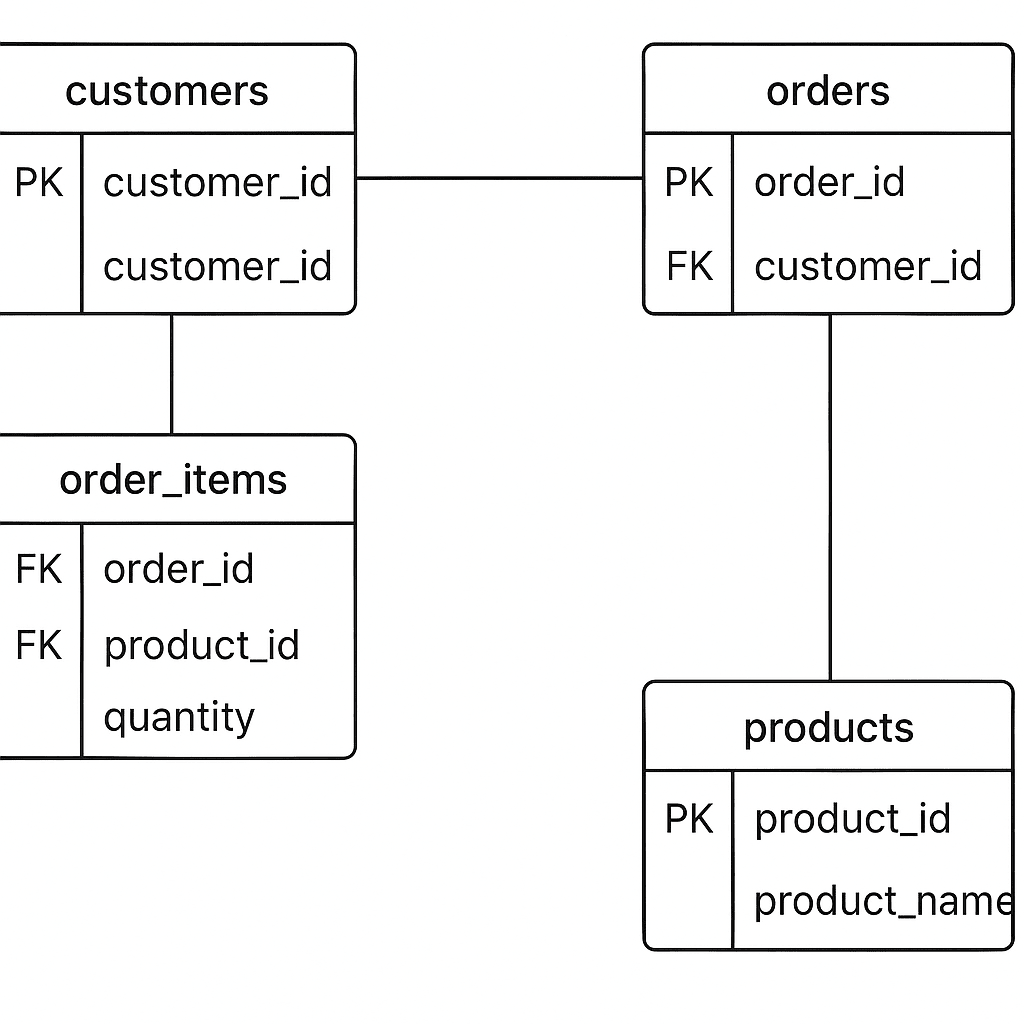
Sample Database Schema
Let's create a realistic e-commerce database:
sql
-- Customers table
CREATE TABLE Customers (
    customer_id INT PRIMARY KEY,
    name VARCHAR(100),
    email VARCHAR(100),
    city VARCHAR(50)
);

-- Orders table
CREATE TABLE Orders (
    order_id INT PRIMARY KEY,
    customer_id INT,
    order_date DATE,
    total_amount DECIMAL(10,2),
    status VARCHAR(20),
    FOREIGN KEY (customer_id) REFERENCES Customers(customer_id)
);

-- Products table
CREATE TABLE Products (
    product_id INT PRIMARY KEY,
    product_name VARCHAR(100),
    price DECIMAL(10,2),
    category VARCHAR(50)
);

-- Order_Items table (junction table for many-to-many relationship)
CREATE TABLE Order_Items (
    order_item_id INT PRIMARY KEY,
    order_id INT,
    product_id INT,
    quantity INT,
    unit_price DECIMAL(10,2),
    FOREIGN KEY (order_id) REFERENCES Orders(order_id),
    FOREIGN KEY (product_id) REFERENCES Products(product_id)
);
Sample Data
sql
-- Insert customers
INSERT INTO Customers VALUES
(1, 'John Smith', 'john@email.com', 'New York'),
(2, 'Maria Garcia', 'maria@email.com', 'Madrid'),
(3, 'Bob Johnson', 'bob@email.com', 'London'),
(4, 'Alice Brown', 'alice@email.com', 'Paris'),
(5, 'Mike Davis', 'mike@email.com', 'Berlin');

-- Insert products
INSERT INTO Products VALUES
(101, 'Laptop', 999.99, 'Electronics'),
(102, 'Smartphone', 699.99, 'Electronics'),
(103, 'Desk Chair', 149.99, 'Furniture'),
(104, 'Coffee Maker', 79.99, 'Kitchen'),
(105, 'Headphones', 199.99, 'Electronics');

-- Insert orders
INSERT INTO Orders VALUES
(1001, 1, '2024-01-15', 1149.98, 'Delivered'),
(1002, 2, '2024-01-20', 849.98, 'Processing'),
(1003, 1, '2024-02-05', 199.99, 'Shipped'),
(1004, 3, '2024-02-10', 149.99, 'Delivered'),
(1005, NULL, '2024-02-12', 79.99, 'Processing'); -- Note: customer_id is NULL

-- Insert order items
INSERT INTO Order_Items VALUES
(1, 1001, 101, 1, 999.99),
(2, 1001, 105, 1, 199.99),
(3, 1002, 102, 1, 699.99),
(4, 1002, 104, 1, 79.99),
(5, 1003, 105, 1, 199.99),
(6, 1004, 103, 1, 149.99),
(7, 1005, 104, 1, 79.99);
INNER JOIN
Returns only the records that have matching values in both tables.
Syntax:
sql
SELECT columns
FROM table1
INNER JOIN table2 ON table1.column = table2.column;
Examples:
sql
-- Join orders with customer information
SELECT o.order_id, o.order_date, o.total_amount, c.name, c.email
FROM Orders o
INNER JOIN Customers c ON o.customer_id = c.customer_id;

-- Get detailed order information with product details
SELECT o.order_id, c.name AS customer_name, p.product_name,
       oi.quantity, oi.unit_price, (oi.quantity * oi.unit_price) AS line_total
FROM Orders o
INNER JOIN Customers c ON o.customer_id = c.customer_id
INNER JOIN Order_Items oi ON o.order_id = oi.order_id
INNER JOIN Products p ON oi.product_id = p.product_id;
LEFT JOIN
Returns all records from the left table, and matched records from the right table.
Syntax:
sql
SELECT columns
FROM table1
LEFT JOIN table2 ON table1.column = table2.column;
Examples:
sql
-- Find customers with no orders
SELECT c.customer_id, c.name, c.email
FROM Customers c
LEFT JOIN Orders o ON c.customer_id = o.customer_id
WHERE o.order_id IS NULL;

-- All customers and their orders (including customers with no orders)
SELECT c.name, c.email, o.order_id, o.order_date, o.total_amount
FROM Customers c
LEFT JOIN Orders o ON c.customer_id = o.customer_id
ORDER BY c.name;
RIGHT JOIN
Returns all records from the right table, and matched records from the left table.
Syntax:
sql
SELECT columns
FROM table1
RIGHT JOIN table2 ON table1.column = table2.column;
Examples:
sql
-- All orders and their customer information (including orders with no customer)
SELECT o.order_id, o.order_date, o.total_amount, c.name
FROM Customers c
RIGHT JOIN Orders o ON c.customer_id = o.customer_id
ORDER BY o.order_date;

-- Alternative syntax (more common)
SELECT o.order_id, o.order_date, o.total_amount, c.name
FROM Orders o
LEFT JOIN Customers c ON o.customer_id = c.customer_id;
FULL JOIN
Returns all records when there's a match in either table.
Note: MySQL doesn't support FULL JOIN directly, but we can simulate it.
Syntax (PostgreSQL/SQL Server):
sql
SELECT columns
FROM table1
FULL JOIN table2 ON table1.column = table2.column;
Simulating FULL JOIN in MySQL:
sql
-- All customers and all orders (with matches where they exist)
SELECT c.customer_id, c.name, o.order_id, o.order_date
FROM Customers c
LEFT JOIN Orders o ON c.customer_id = o.customer_id
UNION
SELECT c.customer_id, c.name, o.order_id, o.order_date
FROM Customers c
RIGHT JOIN Orders o ON c.customer_id = o.customer_id;
CROSS JOIN
Returns the Cartesian product of both tables (every row from table1 combined with every row from table2).
Syntax:
sql
SELECT columns
FROM table1
CROSS JOIN table2;
Example:
sql
-- Create all possible customer-product combinations
SELECT c.name, p.product_name, p.price
FROM Customers c
CROSS JOIN Products p
ORDER BY c.name, p.product_name;
ERDs diagrams:
Practical Exercises
Exercise 1: Join Orders with Customers
sql
-- Basic order-customer join
SELECT o.order_id, o.order_date, o.total_amount, o.status,
       c.name AS customer_name, c.city
FROM Orders o
INNER JOIN Customers c ON o.customer_id = c.customer_id
ORDER BY o.order_date DESC;

-- Customer order summary
SELECT c.name, COUNT(o.order_id) AS order_count,
       SUM(o.total_amount) AS total_spent,
       AVG(o.total_amount) AS avg_order_value
FROM Customers c
LEFT JOIN Orders o ON c.customer_id = o.customer_id
GROUP BY c.customer_id, c.name
ORDER BY total_spent DESC;
Exercise 2: Find Customers with No Orders (LEFT JOIN)
sql
-- Customers who have never placed an order
SELECT c.customer_id, c.name, c.email, c.city
FROM Customers c
LEFT JOIN Orders o ON c.customer_id = o.customer_id
WHERE o.order_id IS NULL;

-- Customers with no orders in the last 30 days
SELECT c.customer_id, c.name, c.email,
       MAX(o.order_date) AS last_order_date
FROM Customers c
LEFT JOIN Orders o ON c.customer_id = o.customer_id
GROUP BY c.customer_id, c.name, c.email
HAVING MAX(o.order_date) < DATE_SUB(CURDATE(), INTERVAL 30 DAY)
    OR MAX(o.order_date) IS NULL;
Exercise 3: Complex Multi-Table Joins
sql
-- Complete order details with customer and product information
SELECT o.order_id, o.order_date, o.status,
       c.name AS customer_name, c.email,
       p.product_name, p.category,
       oi.quantity, oi.unit_price,
       (oi.quantity * oi.unit_price) AS line_total
FROM Orders o
INNER JOIN Customers c ON o.customer_id = c.customer_id
INNER JOIN Order_Items oi ON o.order_id = oi.order_id
INNER JOIN Products p ON oi.product_id = p.product_id
ORDER BY o.order_date DESC, o.order_id;

-- Product sales analysis
SELECT p.product_name, p.category, p.price,
       COUNT(oi.order_id) AS times_ordered,
       SUM(oi.quantity) AS total_quantity_sold,
       SUM(oi.quantity * oi.unit_price) AS total_revenue
FROM Products p
LEFT JOIN Order_Items oi ON p.product_id = oi.product_id
GROUP BY p.product_id, p.product_name, p.category, p.price
ORDER BY total_revenue DESC;
Exercise 4: Advanced Join Scenarios
sql
-- Customers and their favorite product category (most ordered)
SELECT c.name, p.category, COUNT(*) AS order_count
FROM Customers c
INNER JOIN Orders o ON c.customer_id = o.customer_id
INNER JOIN Order_Items oi ON o.order_id = oi.order_id
INNER JOIN Products p ON oi.product_id = p.product_id
GROUP BY c.customer_id, c.name, p.category
HAVING COUNT(*) = (
    SELECT MAX(category_count)
    FROM (
        SELECT COUNT(*) AS category_count
        FROM Orders o2
        INNER JOIN Order_Items oi2 ON o2.order_id = oi2.order_id
        INNER JOIN Products p2 ON oi2.product_id = p2.product_id
        WHERE o2.customer_id = c.customer_id
        GROUP BY p2.category
    ) AS counts
);

-- Monthly sales by category
SELECT YEAR(o.order_date) AS year,
       MONTH(o.order_date) AS month,
       p.category,
       SUM(oi.quantity * oi.unit_price) AS monthly_revenue
FROM Orders o
INNER JOIN Order_Items oi ON o.order_id = oi.order_id
INNER JOIN Products p ON oi.product_id = p.product_id
GROUP BY YEAR(o.order_date), MONTH(o.order_date), p.category
ORDER BY year DESC, month DESC, monthly_revenue DESC;
Real-World Relational Modeling Tips
-
Always define primary keys for each table
-
Use foreign keys to enforce referential integrity
-
Choose appropriate join types based on business requirements
-
Use table aliases for better readability in complex queries
-
Test joins with sample data to ensure correct relationships
-
Consider indexing foreign key columns for better performance
Common Join Patterns in Business Applications
-
User-Order-Product: E-commerce systems
-
Employee-Department: HR systems
-
Student-Course-Grade: Education systems
-
Patient-Appointment-Doctor: Healthcare systems
-
Account-Transaction: Banking systems


Comments (0)
No comments yet. Be the first to comment!