
DevOps & Cloud Topic
Docker and Kubernetes: Build a Small Microservices Lab
Imagine a shop with products, orders and users. In this lab, three small services return made-up data. You will run them with Docker Compose, then see how Kubernetes runs the same images.
What this example teaches: separate processes, ports, service names and deployment settings. It is not a complete shop. There is no payment system, login or database. The services do not call each other. A real order flow also needs validation, access checks and a plan for partial failures.
Start with a working app
Use app.py and the Dockerfile from the Docker guide, or the example bundle. The APP_ROLE setting chooses products, orders or users. The same code serves different mock data. We reuse one image to keep the first exercise small; real services may have separate code and release schedules.
docker build -t lecturre-web:1.0 .Run three services with Compose
Save this as compose.microservices.yaml. Build the image first, so all three services can use it.
services:
  products:
    build: .
    image: lecturre-web:1.0
    environment:
      APP_ROLE: products
    ports:
      - "127.0.0.1:8091:8080"
  orders:
    image: lecturre-web:1.0
    environment:
      APP_ROLE: orders
    ports:
      - "127.0.0.1:8092:8080"
  users:
    image: lecturre-web:1.0
    environment:
      APP_ROLE: users
    ports:
      - "127.0.0.1:8093:8080"
docker compose -f compose.microservices.yaml config
docker compose -f compose.microservices.yaml up -d
curl http://127.0.0.1:8091/
curl http://127.0.0.1:8092/
curl http://127.0.0.1:8093/
You should see a product, an order and a user in the three JSON responses. Ports 8091, 8092 and 8093 belong to your computer. Each container listens on its own port 8080. This works because each container has its own network space.
In this Compose network, a future orders service could call http://products:8080/. It would not call localhost:8091, which is a host-side address. Do not add that call just to make the diagram look like microservices: first decide what data the order service really needs and how a failure should work.
What changes in Kubernetes?
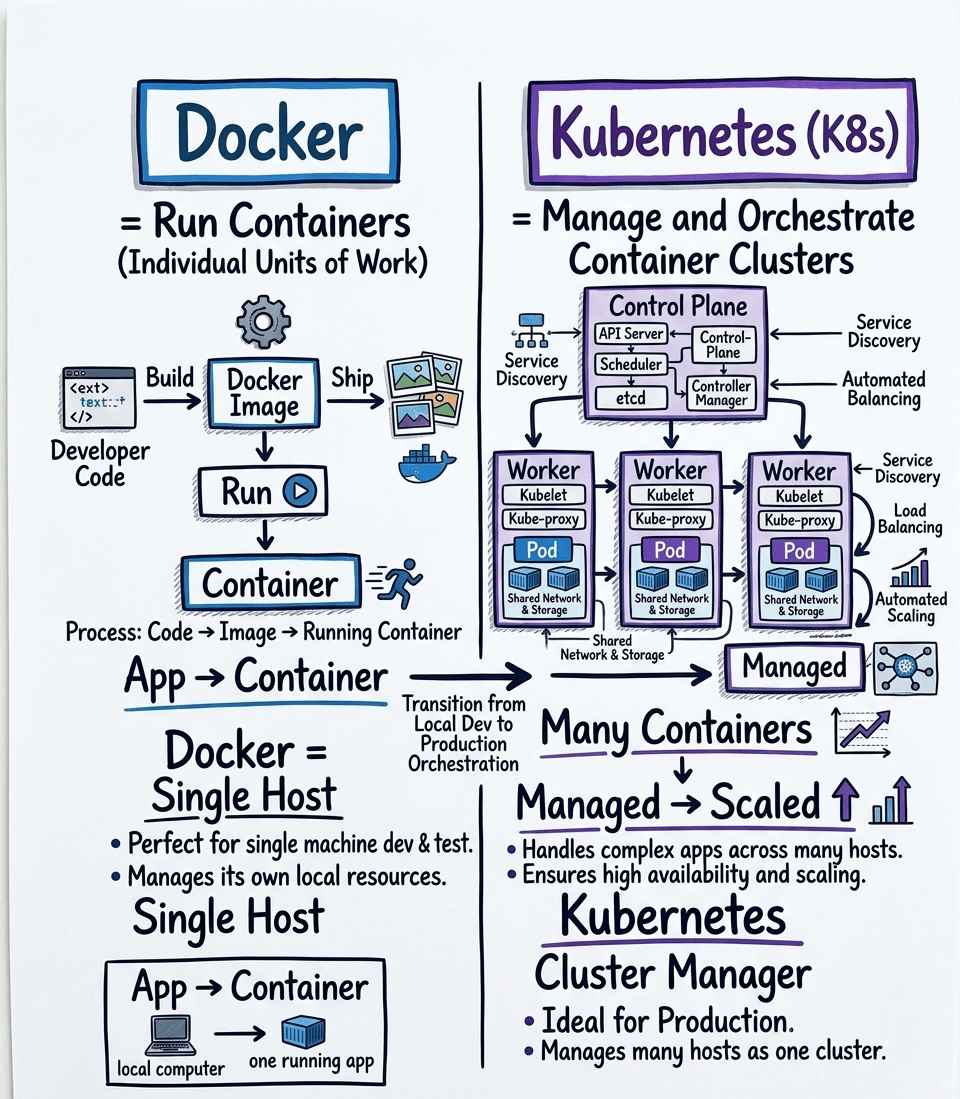
A Deployment keeps the requested number of Pods running. A Service gives a stable name to the matching Pods. A label joins them: the Service selector must match the Pod labels. A container port entry describes a port; it does not expose the app to the public internet.
Use the local kind cluster from the Kubernetes lesson. The example bundle has microservices.yaml with a Deployment and Service for each role. Each Deployment sets APP_ROLE and includes health checks and resource limits.
Save this complete file as microservices.yaml:
apiVersion: apps/v1
kind: Deployment
metadata:
  name: products
  namespace: lecturre-lab
spec:
  replicas: 1
  revisionHistoryLimit: 3
  selector:
    matchLabels:
      app: products
  template:
    metadata:
      labels:
        app: products
    spec:
      automountServiceAccountToken: false
      securityContext:
        runAsNonRoot: true
        runAsUser: 10001
        runAsGroup: 10001
        seccompProfile:
          type: RuntimeDefault
      containers:
      - name: products
        image: lecturre-web:1.0
        imagePullPolicy: IfNotPresent
        ports:
        - containerPort: 8080
        resources:
          requests:
            cpu: 50m
            memory: 64Mi
          limits:
            cpu: 250m
            memory: 128Mi
        securityContext:
          allowPrivilegeEscalation: false
          readOnlyRootFilesystem: true
          capabilities:
            drop:
            - ALL
        startupProbe:
          httpGet:
            path: /health
            port: 8080
          failureThreshold: 12
          periodSeconds: 5
        readinessProbe:
          httpGet:
            path: /health
            port: 8080
          periodSeconds: 5
        livenessProbe:
          httpGet:
            path: /health
            port: 8080
          periodSeconds: 10
        env:
        - name: APP_ROLE
          value: products
---
apiVersion: v1
kind: Service
metadata:
  name: products
  namespace: lecturre-lab
spec:
  selector:
    app: products
  ports:
  - port: 80
    targetPort: 8080
---
apiVersion: apps/v1
kind: Deployment
metadata:
  name: orders
  namespace: lecturre-lab
spec:
  replicas: 1
  revisionHistoryLimit: 3
  selector:
    matchLabels:
      app: orders
  template:
    metadata:
      labels:
        app: orders
    spec:
      automountServiceAccountToken: false
      securityContext:
        runAsNonRoot: true
        runAsUser: 10001
        runAsGroup: 10001
        seccompProfile:
          type: RuntimeDefault
      containers:
      - name: orders
        image: lecturre-web:1.0
        imagePullPolicy: IfNotPresent
        ports:
        - containerPort: 8080
        resources:
          requests:
            cpu: 50m
            memory: 64Mi
          limits:
            cpu: 250m
            memory: 128Mi
        securityContext:
          allowPrivilegeEscalation: false
          readOnlyRootFilesystem: true
          capabilities:
            drop:
            - ALL
        startupProbe:
          httpGet:
            path: /health
            port: 8080
          failureThreshold: 12
          periodSeconds: 5
        readinessProbe:
          httpGet:
            path: /health
            port: 8080
          periodSeconds: 5
        livenessProbe:
          httpGet:
            path: /health
            port: 8080
          periodSeconds: 10
        env:
        - name: APP_ROLE
          value: orders
---
apiVersion: v1
kind: Service
metadata:
  name: orders
  namespace: lecturre-lab
spec:
  selector:
    app: orders
  ports:
  - port: 80
    targetPort: 8080
---
apiVersion: apps/v1
kind: Deployment
metadata:
  name: users
  namespace: lecturre-lab
spec:
  replicas: 1
  revisionHistoryLimit: 3
  selector:
    matchLabels:
      app: users
  template:
    metadata:
      labels:
        app: users
    spec:
      automountServiceAccountToken: false
      securityContext:
        runAsNonRoot: true
        runAsUser: 10001
        runAsGroup: 10001
        seccompProfile:
          type: RuntimeDefault
      containers:
      - name: users
        image: lecturre-web:1.0
        imagePullPolicy: IfNotPresent
        ports:
        - containerPort: 8080
        resources:
          requests:
            cpu: 50m
            memory: 64Mi
          limits:
            cpu: 250m
            memory: 128Mi
        securityContext:
          allowPrivilegeEscalation: false
          readOnlyRootFilesystem: true
          capabilities:
            drop:
            - ALL
        startupProbe:
          httpGet:
            path: /health
            port: 8080
          failureThreshold: 12
          periodSeconds: 5
        readinessProbe:
          httpGet:
            path: /health
            port: 8080
          periodSeconds: 5
        livenessProbe:
          httpGet:
            path: /health
            port: 8080
          periodSeconds: 10
        env:
        - name: APP_ROLE
          value: users
---
apiVersion: v1
kind: Service
metadata:
  name: users
  namespace: lecturre-lab
spec:
  selector:
    app: users
  ports:
  - port: 80
    targetPort: 8080
kind load docker-image lecturre-web:1.0 --name lecturre-lab
kubectl --context kind-lecturre-lab apply -f k8s/namespace.yaml
kubectl --context kind-lecturre-lab apply -f microservices.yaml
kubectl --context kind-lecturre-lab -n lecturre-lab get pods,services
kubectl --context kind-lecturre-lab -n lecturre-lab rollout status deployment/products
kubectl --context kind-lecturre-lab -n lecturre-lab port-forward service/products 8094:80
Keep the last command open. In another terminal, run curl http://127.0.0.1:8094/. You should receive the product response. Port forwarding gives your machine a temporary path to the Service; it is not a production public endpoint.
Find a broken service
If a Pod is not ready, describe the Pod and read its logs. An image pull error means the runtime cannot get the image. For this local lab, load the image into the named kind cluster. If a Service has no endpoints, check its selector and the Pod's readiness. If the wrong data appears, check APP_ROLE.
kubectl --context kind-lecturre-lab -n lecturre-lab logs deployment/products
kubectl --context kind-lecturre-lab -n lecturre-lab describe deployment/products
kubectl --context kind-lecturre-lab -n lecturre-lab get endpointslices
When should you split an app?
Separate services can help teams release and scale parts independently. They also add network failures, more deployments and harder debugging. A small team can start with one well-organised app. Split it when a clear need is worth the extra work.
Before adding real orders, decide who owns each piece of data. Add timeouts and bounded retries for network calls. Use an idempotency key when a repeated request must not create a second order. Trace requests across services, and protect private data. Kubernetes does not make these decisions for you.
Practice and clean up
Change the product name in the source, build image 1.1, and update only the products Deployment to that image. Load the new image into kind first. Confirm that orders still works. This shows separate deployment settings, even though our teaching services share one code base.
docker compose -f compose.microservices.yaml down
kubectl --context kind-lecturre-lab -n lecturre-lab delete -f microservices.yaml
Stop any port-forward processes too. Only run these commands against the named local lab. Keep real cluster work separate.
Official references and further reading
Reviewed on 25 October 2026. Tools change, so check the official documentation for the version you use.


Comments (0)
No comments yet. Be the first to comment!