
Java Topic
Java Strings
In Java, strings are a core feature, used to represent sequences of characters. Java provides the String class to create and manipulate strings.
1. Creating Strings
Strings in Java can be created in several ways:
- Using String Literals:
This creates a string object in the string pool if it doesn't already exist.String str1 = "Hello, World!"; - Using the
newKeyword:
This creates a new string object in the heap memory, even if the string already exists in the string pool.String str2 = new String("Hello, World!");
2. String Characteristics
Immutability: Strings in Java are immutable, meaning once a String object is created, its value cannot be changed. Any modification to a string results in the creation of a new string.
String Pool: Java maintains a special memory region called the 'string pool' to store string literals. If a string is created using a literal and already exists in the pool, Java will reuse the reference rather than creating a new object.
3. Common String Methods
Java provides many useful methods to manipulate and work with strings:
- Length of String:
Returns the length of the string.int len = str1.length(); - Concatenation:
Using theString str3 = str1 + " How are you?";+operator.
Using theString str4 = str1.concat(" How are you?");concatmethod. - Character Access:
Returns the character at the specified index.char c = str1.charAt(0); - Substring:
Returns a substring from index 7 to the end.String sub = str1.substring(7);
Returns a substring from index 7 to 11.String sub2 = str1.substring(7, 12); - String Comparison:
Compares strings for equality.boolean equals = str1.equals(str2);
Ignores case.boolean equalsIgnoreCase = str1.equalsIgnoreCase("hello, world!");
Lexicographically compares two strings.int cmp = str1.compareTo(str2); - String Search:
Returns the index of the first occurrence of "World".int index = str1.indexOf("World");
Returns the last occurrence of 'o'.int lastIndex = str1.lastIndexOf('o'); - String Replace:
Replaces "World" with "Java".String replaced = str1.replace("World", "Java"); - Trim:
Removes leading and trailing whitespace.String trimmed = str1.trim(); - Split:
Splits the string into an array based on the delimiter.String[] parts = str1.split(","); - Convert to Upper or Lower Case:
Converts the string to uppercase.String upper = str1.toUpperCase();
Converts the string to lowercase.String lower = str1.toLowerCase();
4. StringBuffer and StringBuilder
For scenarios requiring frequent modification of strings, Java provides StringBuffer and StringBuilder classes:
- StringBuffer:
Mutable sequence of characters, thread-safe.
Modifies the same object.StringBuffer sb = new StringBuffer("Hello"); sb.append(" World!"); - StringBuilder:
Similar toStringBuffer, but not thread-safe (faster in single-threaded environments).
Modifies the same object.StringBuilder sb = new StringBuilder("Hello"); sb.append(" World!");
5. String Conversion
Strings can be easily converted to other data types and vice versa:
- String to Primitive Types:
int num = Integer.parseInt("123"); double d = Double.parseDouble("3.14"); - Primitive Types to String:
String str = String.valueOf(123);
String str2 = Integer.toString(456);
6. String Interning
The intern() method can be used to return a canonical representation of the string, ensuring that all equal strings share the same memory reference.
String interned = str1.intern();
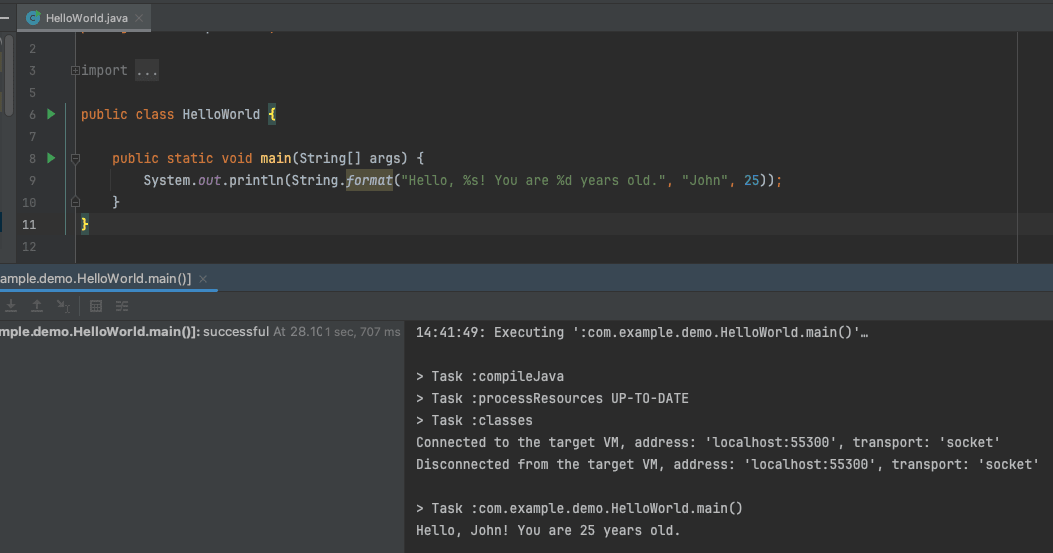
7. String Formatting
Java provides a String.format() method to create formatted strings:
String formatted = String.format("Hello, %s! You are %d years old.", "John", 25);
8. Checking if a String is Empty
boolean isEmpty = str1.isEmpty();
Checks if the string is empty.


Comments (0)
No comments yet. Be the first to comment!